


Introduction
Every watt a server uses ends up as heat. Remove that heat too slowly and chips throttle or fail. Remove it inefficiently and the energy bill climbs. That is why choosing between the different types of data center cooling systems is one of the biggest decisions an operator makes.
The stakes are rising fast. Lawrence Berkeley National Laboratory now estimates that US data centers could use 11.8% of the nation's electricity by 2030, driven largely by AI hardware that runs hotter and denser than anything before it.
This guide explains how data centers are cooled, compares the seven main cooling methods, and covers what each one costs in energy and water. It ends with an emerging alternative: using the cold water of the deep ocean.
What Is Data Center Cooling and Why Does It Matter?
Data center cooling is the set of systems that remove heat from servers, storage, and networking equipment and keep it within safe operating temperatures. It usually pairs equipment inside the server room, such as fans, air handlers, or liquid loops, with a central plant that rejects the heat outdoors.
How much energy does cooling use?
The industry measures this overhead with power usage effectiveness (PUE): total facility energy divided by the energy used by IT equipment. The Uptime Institute Global Data Center Survey 2026 put the average at 1.52. That means roughly a third of the power entering a typical facility does something other than computing.
Cooling is the largest part of that overhead. In conventional facilities it can account for up to around 40% of a data center's electricity use. The most efficient new hyperscale sites do far better, which shows how much the choice of cooling system matters. Lowering PUE is the clearest way to cut both cost and carbon.
Why cooling demand is rising
US data centers used 176 TWh of electricity in 2023, about 4.4% of the national total, according to the 2024 LBNL report for the Department of Energy. The 2025 update projects 649 TWh by 2030, with a range of 9.5% to 15.3% of US electricity.
AI is the main driver. Graphics processors pack far more power into each rack than traditional servers, and a single hyperscale facility can now draw more than 100 MW. More power in a smaller space means more heat to remove, and older cooling methods are struggling to keep up.
How Are Data Centers Cooled? The Basics
Every data center cooling system does the same job: it moves heat from the chips to somewhere it can be released. That journey usually has four stages.
Capture. Air or liquid passes over or through the hot components and absorbs their heat.
Transport. Fans, ducts, pipes, or pumps carry that heat away from the IT equipment.
Transfer. A heat exchanger, chiller, or coolant distribution unit passes the heat from the room's air or liquid into a separate water or refrigerant loop.
Rejection. Cooling towers, dry coolers, or a natural water source release the heat into the outside air or water.
The main types of data center cooling fall into three broad families, based on how they capture and reject heat:
Air-based cooling uses chilled air to carry heat away from servers.
Liquid-based cooling brings water or a special fluid directly to the hardware, which carries heat far more effectively than air.
Evaporative and natural cooling use evaporation, outside air, or a natural body of water to reject heat with little or no mechanical refrigeration.
Most facilities combine methods from more than one family.
7 Types of Data Center Cooling Systems
These are the seven main types of data center cooling systems in use today, from the most familiar to the most innovative.
1. Air cooling (CRAC and CRAH units)
Air cooling is the traditional approach. Computer room air conditioners (CRACs) use refrigerant to chill air, while computer room air handlers (CRAHs) use chilled water from a central plant. Cold air is pushed through the room, often up through a raised floor, and drawn through the servers.
Most modern facilities arrange racks in hot aisles and cold aisles, then add containment panels so hot exhaust air doesn't mix with cold supply air. In-row cooling goes a step further, placing cooling units between racks to shorten the distance air has to travel.
Pros: Proven, widely understood, and compatible with almost all standard IT equipment.
Cons: Air carries heat poorly, so fans and chillers use a lot of energy. It struggles with the dense racks used for AI.
Best for: Enterprise and colocation facilities with low to moderate rack densities.
2. Chilled water systems and cooling towers
In a chilled water system, a central plant produces cold water that is piped to air handlers or liquid cooling equipment. The heat picked up from the data hall is carried back to chillers, then rejected outdoors, often through data center cooling towers that release heat by evaporating water.
Pros: Scales well for large facilities and serves many halls from one plant.
Cons: Chillers are among the most energy-hungry equipment in a data center. Cooling towers consume large volumes of water.
Best for: Large and hyperscale campuses with reliable water supplies.
3. Evaporative cooling
Evaporative cooling uses the fact that water absorbs heat as it evaporates. Direct systems pass outside air through wet media to cool it. Indirect systems cool a separate air or water stream through a heat exchanger, so moist air never reaches the servers.
Pros: Uses far less electricity than mechanical refrigeration.
Cons: Consumes significant water, and works best in dry climates. Humidity limits its effectiveness.
Best for: Facilities in hot, dry regions where electricity savings outweigh water costs.
4. Free cooling and economizers
Free cooling uses naturally cold outside air or water to replace mechanical cooling for part or all of the year. Air-side economizers bring filtered outside air into the data hall. Water-side economizers use cold outdoor conditions to chill the water loop without running chillers.
Pros: Large energy savings when the climate cooperates.
Cons: Savings depend on location and season, so most sites still need backup mechanical cooling. Outside air must be filtered and humidity controlled.
Best for: Facilities in cool climates, such as Northern Europe and the northern United States.
5. Liquid cooling (direct-to-chip and rear-door heat exchangers)
Data center liquid cooling brings coolant much closer to the source of the heat. Direct-to-chip systems run liquid through cold plates mounted on processors and graphics chips. Rear-door heat exchangers replace a rack's back panel with a liquid-cooled coil that absorbs heat from exhaust air.
A coolant distribution unit (CDU) manages the flow, pressure, and temperature of the liquid loop and transfers heat to the facility's water system.
Pros: Liquid carries heat far more effectively than air, making high-density AI racks practical and reducing fan energy.
Cons: Higher upfront cost, new plumbing inside the data hall, and a facility-level heat rejection system is still required.
Best for: AI training, high-performance computing, and other high-density workloads.
6. Immersion cooling
Immersion cooling submerges servers in a non-conductive liquid. In single-phase systems the fluid stays liquid and is pumped through a heat exchanger. In two-phase systems the fluid boils on hot components, then condenses and drips back down.
Pros: Handles very high heat densities and removes the need for server fans.
Cons: Requires specialized tanks, fluids, and maintenance procedures, and not all hardware is certified for it.
Best for: The densest computing workloads and operators willing to redesign their facilities.
7. Natural water cooling (lakes, seawater, and the deep ocean)
Natural water cooling uses a cold body of water as the heat sink, replacing chillers and cooling towers. The approach is proven. Google's data center in Hamina, Finland is cooled entirely by seawater from the Gulf of Finland. Toronto's deep lake water cooling system serves several of the city's data centers, as Data Center Knowledge has reported.
Pros: Very low cooling energy and little or no evaporative water loss.
Cons: Only possible near suitable water, with significant upfront engineering, corrosion protection, and environmental safeguards.
Best for: Coastal and lakeside sites. As we explain below, the deep ocean takes this approach furthest.
Data Center Cooling Systems Compared
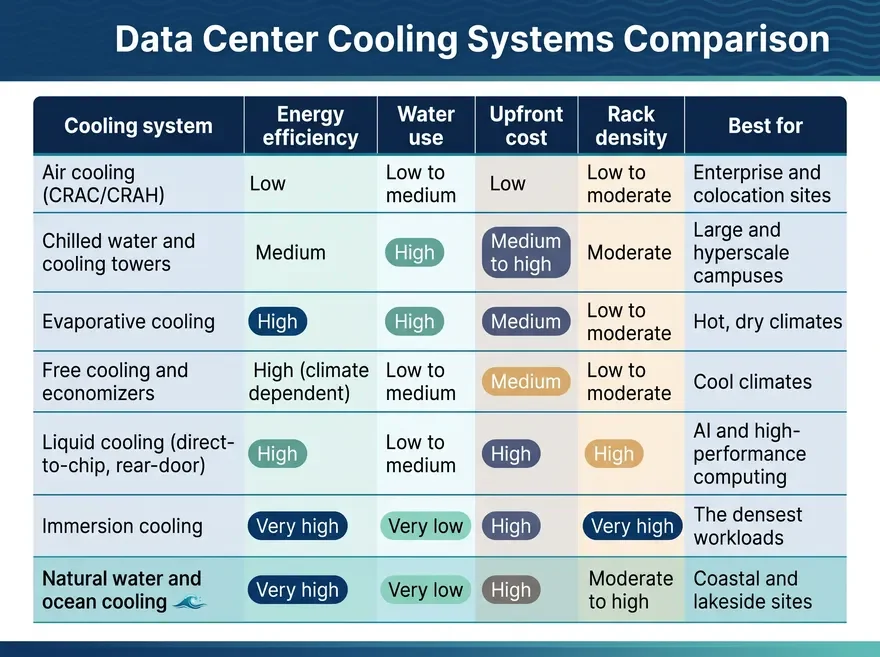
No single system wins on every measure. This table compares the seven types of data center cooling systems at a glance; ratings are relative to one another.
What Is the Best Cooling System for a Data Center?
The best cooling system for a data center is the one that matches its heat load, location, and priorities. Five questions narrow the choice quickly.
How dense are the racks? Low and moderate densities suit air cooling. AI and high-performance computing generally need liquid or immersion cooling.
What is the climate? Cool regions can rely heavily on free cooling, while hot, dry regions favor evaporative systems.
Is water scarce? In drought-prone areas, closed-loop liquid cooling or natural water cooling avoids heavy evaporative losses.
What is the budget? Air cooling is cheapest to install, but liquid, immersion, and natural water cooling usually cost less to run.
What are the sustainability targets? Operators with tight PUE, carbon, or water goals will need to move beyond conventional air and chilled water systems.
Most large facilities end up with a hybrid, such as liquid cooling for AI halls and air cooling for general workloads.
The Hidden Costs of Data Center Cooling: Energy, Water, and PUE
The price of a cooling system doesn't end at installation. Over a facility's life, energy and water often cost far more than the equipment itself.
Data center cooling costs
Chillers, fans, pumps, and cooling towers run around the clock, every day of the year. Because cooling is the largest share of a data center's non-IT energy use, even small efficiency gains add up to major savings. Maintenance, refrigerant management, and water treatment add further operating costs.
Water consumption
Many cooling systems use water as well as power. US data centers directly consumed about 17.4 billion gallons of water in 2023, mostly for cooling, according to LBNL estimates summarized by the Information Technology and Innovation Foundation. Evaporative systems and cooling towers account for much of that.
Water use is becoming a siting issue in its own right, particularly in drought-prone regions such as the Southwest. In response, hyperscalers including Microsoft are moving to closed-loop designs that use little or no water for cooling.
Ocean Cooling: How OceanBit Takes Cooling Out of the Equation
Natural water cooling works best where the water is coldest and most plentiful, and nowhere has more cold water than the deep ocean. OceanBit is building data centers that use it directly.
OceanBit's converted vessels double as baseload renewable powerplants and offshore data centers. Cold seawater drawn from the deep ocean cools the servers, removing the need for chillers, cooling towers, and the electricity they consume. Because the system uses seawater rather than evaporating fresh water, it has zero water consumption.
Since the deep water is being pumped as part of the power generation process anyway, the result is a power usage effectiveness of the onboard data center is about 1.0, compared with the industry average of 1.52. In practical terms, nearly every kilowatt-hour goes to computing rather than cooling, which can cut a data center's energy consumption by up to around 40%.
The power is generated using ocean thermal energy conversion (OTEC), turning the temperature difference between warm surface water and cold deep water into carbon-free electricity, around the clock. The data centers connect to the global network of existing submarine cables, so operators get reliable connectivity without building new land-based infrastructure.
For operators facing rising power demand, tight water supplies, and ambitious sustainability targets, ocean cooling offers a way to scale without the trade-offs of conventional systems. Learn more about OceanBit's Data Center Solutions.
Conclusion: Choosing the Right Data Center Cooling System
There is no single best answer among the types of data center cooling systems. Air cooling remains a reliable workhorse, liquid and immersion cooling are unlocking the dense racks AI demands, and free and evaporative cooling make the most of the right climate.
But as power demand climbs and water becomes harder to secure, the most efficient option is the one that removes the need for mechanical cooling altogether. Cold water from the deep ocean does exactly that, while ocean thermal energy powers the servers with carbon-free electricity.
Ready to explore ocean-cooled computing? Contact OceanBit to find out how our offshore data centers can support your next deployment.
-
Most data centers still use air cooling, typically computer room air handlers supplied by a chilled water plant, with hot and cold aisle containment. Liquid cooling is growing quickly, however, because AI hardware produces more heat than air can efficiently remove.
-
For high-density workloads, yes. Liquid carries heat far more effectively than air, so data center liquid cooling handles AI and high-performance computing racks with less fan energy. Air cooling remains cheaper to install and works well for low- and moderate-density equipment.
-
Cooling is usually the largest energy cost after the IT equipment itself, and in conventional facilities it can reach around 40% of total electricity use. Exact costs depend on the cooling system, climate, local power prices, and water prices.
-
Yes. Google's data center in Hamina, Finland, has been cooled entirely by seawater from the Gulf of Finland for more than a decade. OceanBit goes further, using cold water from the deep ocean to cool offshore data centers with zero water consumption.
-
Cooling is the largest contributor to the overhead that PUE measures. The more energy a cooling system uses, the higher the PUE. Efficient methods such as free cooling, liquid cooling, and ocean cooling bring PUE closer to the ideal of 1.0.